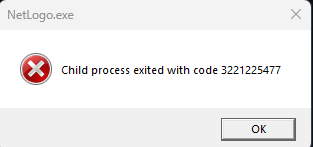
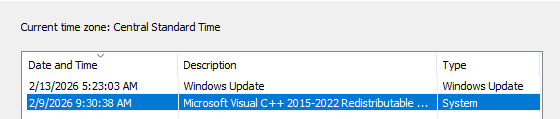
I recently encountered a problem after a Windows update.
Whenever I try to use NetLogo to open a local folder (for example, when selecting Open Model or Save Model As), I receive an error message. However, I am still able to load models directly from the built-in model library without any issues.
The problem specifically occurs whenever NetLogo tries to open Windows File Explorer.
I also noticed a similar issue with Dropbox. When I attempted to change the Dropbox folder location (which opens Windows File Explorer), the same type of error appeared.
After some troubleshooting, I found that the issue might be related to Microsoft Visual C++ Redistributable. I uninstalled the latest version and installed the 2022 version instead. This fixed the Dropbox issue, but the problem with NetLogo persists.
Has anyone experienced something similar or found a solution? Any help would be greatly appreciated.
Thank you for the bug report, that’s certainly not something we’ve encountered before. Since the problem also occurs with Dropbox, it is most likely an issue with your specific Windows environment or installation. If you could clarify the following things, it might help us narrow down the source of the problem:
Which version of Windows did you update to when the problem first occurred?
When the problem occurred, were you using any NetLogo extensions, and if so, which ones?
Are you able to successfully open File Explorer from any other applications, or does it only work when you open the app manually?
Something else you could try in the meantime is to open Task Manager (Ctrl+Shift+Esc), search for “explorer”, and force quit all the processes that appear in the list. If that doesn’t change anything, then we can keep looking into the questions I asked above.
I know the problem is due to this update because the update time exactly matched the issue time. I had no problem of using NetLogo that morning around 5:00 am. But when I tried to use it around 11 am, the problem started to emerge.
I didn’t use any extension.
Yes I am able to successfully open File Explorer from other applications. I tried MS word, snipping tool, Endnote
I uninstalled a older version of the C++ redistributable. It fixed the Dropbox problem, but not netLogo.
I can’t end the explorer but can restart it. After restarting it, the problem was still there.
I just uninstalled and reinstalled NetLogo, the problem was still there..
@okliangnan Thank you for the clarification. I’m not entirely sure what is going wrong, because I have the same version of Windows 11 as well as the Microsoft Visual C++ 2015-2022 Redistributable, and NetLogo runs as expected for me.
As a next step, I would recommend looking for the crash in the Event Viewer, which you can find by searching for it in the Start menu. If you open the Event Viewer right after generating the crash in NetLogo, you should be able to find the corresponding error listed in the Windows Logs > Application or Windows Logs > System sections on the left. If you find it, the Event Viewer can often provide a more descriptive error message that would help us narrow down the issue.
If you are familiar with using the Command Prompt, another thing you could try is the following method:
Open the Command Prompt (or PowerShell) as an administrator
Run the command sxstrace trace -logfile:trace.etl
Open NetLogo and perform the steps needed to reproduce the issue
In the Command Prompt, press Enter to stop the trace, then run the command sxstrace parse -logfile:trace.etl -outfile:trace.txt
The steps above will generate a log of various info and errors regarding Windows libraries that are loaded while you run NetLogo, so there’s a chance that a hint to the problem could be in the resulting trace.txt.
I apologize that it’s getting rather technical; it can be difficult to debug system-level errors. If you are uncomfortable with or unable to perform either of the above options, let me know and I can provide more helpful instructions or screenshots of the process.
Thank you a lot for your help. The problem is fixed with new Windows update.
Short summary: If anyone else has the same issue, do not use Save As nor Open file (both of which will call for the process that interacts with Windows Explorer). Simply double click the model file to open it and use copy-paste to “Save As.“
Then wait for a while and install Windows update as long as they are available. Some updates will eventually fix the issue.
Here is a brief history of my debugging process:
I tried your method but the system log did not have any error/warning messages related to the Netlogo, and the trace.txt is empty.
I searched netlogo in the event viewer and found that some log has three components in one record: Netlogo, Explorer, and Dropbox
I used ChatGPT to explain the log, ChatGPT said that it is Netlogo tried to open a file, which triggered dropbox to trigger some firewall rule, which is then denied.
However, the problem still exists after I quit dropbox.
At this point, I was so frustrated and decided no long to use the save as function and never use the open file function.
However, I installed all windows update, the problem is gone…. Using ChatGPT to explain all updates, ChatGPT said that it might be due to some incompatibility issue with Java and Driver..
Great to hear that it fixed itself! Sounds like there were just some strange unexpected interactions between applications. Just a heads up, we do plan to update from Java 17 to Java 21 in the not-so-distant future, so an issue like this may occur again when that happens. Feel free to let us know again on the Forum or on GitHub if you experience any similar issues then!